Epson Setting Assistant
Seiko Epson Corporation- Rating 3+Batasan usia
- ProduktivitasKategori
- 31/8/2026Diperbarui
- GratisHarga
Tertaut ke halaman resmi com.epson.projector.settingassistant di Google Play. Terakhir diperiksa pada 27/11/2026.
Tangkapan layar
Tentang aplikasi ini
Terjemahan otomatis oleh Google. Bahasa asli: Inggris (Amerika Serikat).
Perbaiki bentuk gambar yang diproyeksikan dengan mengambil gambar dengan kamera Anda.
Epson Setting Assistant adalah aplikasi yang secara otomatis mengoreksi bentuk gambar yang diproyeksikan menggunakan kamera Anda.
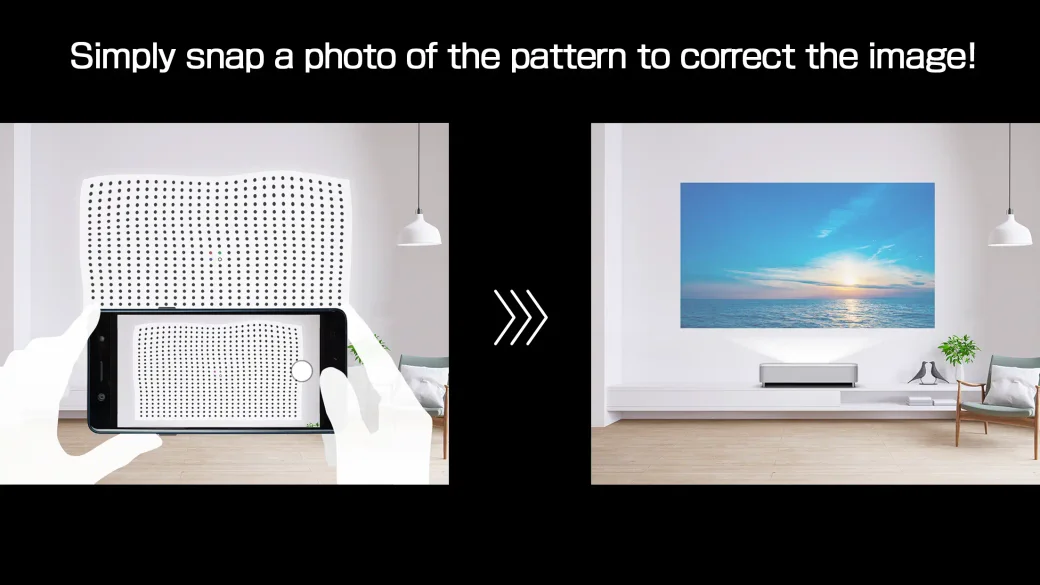
Dengan mengambil gambar pola yang diproyeksikan, aplikasi secara otomatis mengoreksi distorsi pada gambar yang diproyeksikan dan menyesuaikan bentuknya agar sesuai dengan layar.
[Fitur Utama]
1) Koreksi bentuk
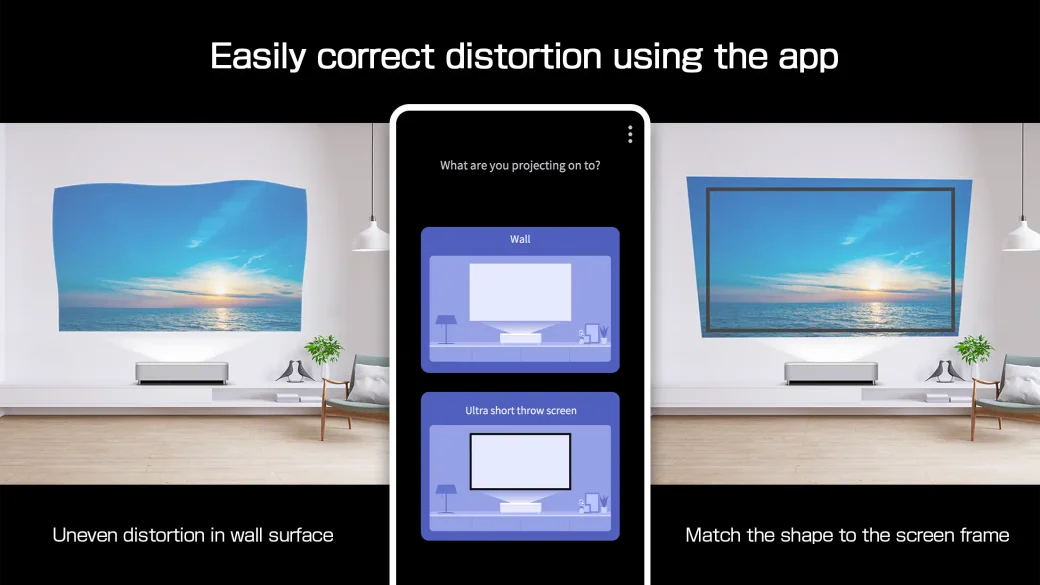
Aplikasi menyesuaikan gambar menjadi bentuk persegi panjang atau menyelaraskannya dengan bingkai, seperti layar proyektor.
2) Koreksi ketidakrataan
Aplikasi mendeteksi ketidakrataan permukaan kecil, seperti pada dinding, dan mengoreksi distorsi pada gambar yang diproyeksikan.
[Untuk Pengguna Proyektor Rumah (Seri EH): Menggunakan Aplikasi]
Pastikan perangkat Android Anda dan proyektor terhubung ke jaringan yang sama.
1. Pilih [Instalasi] ([Instalasi] > [Panduan Koreksi Geometri]) dari menu proyektor.
2. Buka aplikasi ini di perangkat Android Anda dan pilih [Rumah] sebagai jenis proyektor untuk terhubung secara otomatis ke proyektor.
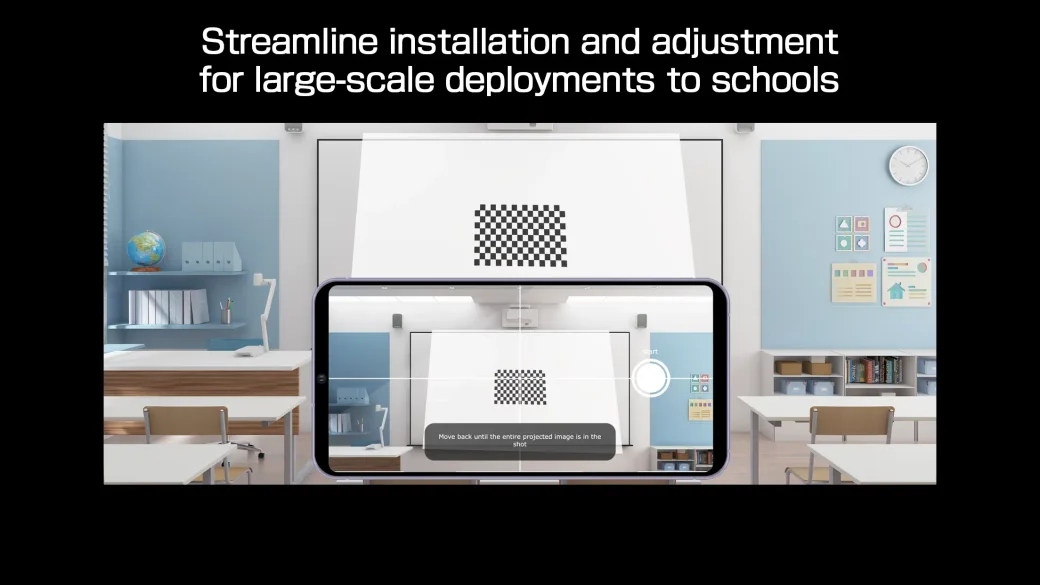
3. Ikuti petunjuk di layar untuk mengambil gambar pola yang diproyeksikan menggunakan kamera di aplikasi, dan koreksi akan diselesaikan secara otomatis.
[Untuk Pengguna Proyektor Bisnis (Seri EB): Menggunakan Aplikasi]
Pastikan pengaturan [Daya LAN Nirkabel] diatur ke [Aktif] di menu [Manajemen] proyektor.
1. Pilih [Instalasi] > [Hubungkan ke Asisten Pengaturan] dari menu proyektor untuk memproyeksikan kode QR.
2. Buka aplikasi ini di perangkat Android Anda, pilih [Bisnis] sebagai jenis proyektor, lalu pindai kode QR untuk terhubung ke proyektor secara otomatis.
3. Ikuti petunjuk di layar untuk mengambil gambar pola yang diproyeksikan menggunakan kamera di aplikasi, dan koreksi akan diselesaikan secara otomatis.
[Proyektor yang Didukung]
Kunjungi https://support.epson.net/projector_appinfo/setting_assistant/en/ untuk detailnya.
Tergantung pada model proyektor Anda, beberapa fitur mungkin tidak tersedia.
[Catatan penggunaan]
Tergantung pada lingkungan Anda, seperti permukaan proyeksi yang melengkung atau wallpaper dengan tekstur atau pola yang kasar, koreksi otomatis menggunakan aplikasi mungkin tidak tersedia. Dalam situasi ini, harap koreksi bentuk gambar dari menu proyektor.
Tergantung pada ponsel pintar/tablet Anda, pengaturan Wi-Fi mungkin mencegah Anda untuk sementara terhubung ke proyektor. Matikan Wi-Fi Anda lalu hidupkan kembali dan coba lagi.
Untuk poin-poin penting yang lebih detail, kunjungi https://download2.ebz.epson.net/sec_pubs_visual/apps/setting_assistant/230/EN/index.html.
Anda juga dapat memeriksanya dari [Panduan dukungan online] di menu di kanan atas aplikasi.
Gambar yang digunakan di sini hanya untuk tujuan ilustrasi. Gambar sebenarnya mungkin berbeda.
Kami menyambut setiap umpan balik yang Anda berikan yang dapat membantu kami meningkatkan aplikasi ini. Anda dapat menghubungi kami melalui "Kontak pengembang". Harap dicatat bahwa kami tidak dapat menjawab pertanyaan individual. Untuk pertanyaan mengenai informasi pribadi, silakan hubungi cabang regional Anda yang tercantum dalam Pernyataan Privasi.
[Izin Aplikasi]
Untuk menggunakan aplikasi, izin berikut diperlukan.
[Wajib] Kamera
Untuk mengambil pola koreksi atau kode QR untuk koneksi.
Tampilkan teks asli
Epson Setting Assistant is an app that automatically corrects the shape of a projected image by using your camera.
By taking a shot of the projected pattern, the app automatically corrects distortion in the projected image and adjusts its shape to match the screen.
[Main Features]
1) Shape correction
The app adjusts the image to a rectangular shape or aligns it with a frame, such as a projector screen.
2) Unevenness correction
The app detects small surface irregularities, such as on a wall, and corrects distortion in the projected image.
[For Home Projector (EH Series) Users: Using the App]
Make sure your Android device and the projector are connected to the same network.
1. Select [Installation] ([Installation] > [Geometry Correction Wizard]) from the projector's menu.
2. Open this app on your Android device and select [Home] as the projector type to automatically connect to the projector.
3. Follow the on-screen instructions to take a shot of the projected pattern using the camera in the app, and the corrections will be completed automatically.
[For Business Projector (EB Series) Users: Using the App]
Make sure the [Wireless LAN Power] setting is set to [On] in the projector‘s [Management] menu.
1. Select [Installation] > [Connect to Setting Assistant] from the projector's menu to project a QR code.
2. Open this app on your Android device, select [Business] as the projector's type, and then scan the QR code to automatically connect to the projector.
3. Follow the on-screen instructions to take a shot of the projected pattern using the camera in the app, and the corrections will be completed automatically.
[Supported Projectors]
Visit https://support.epson.net/projector_appinfo/setting_assistant/en/ for details.
Depending on your projector model, some features may not be available.
[Notes for use]
Depending on your environment, such as a curved projection surface or wallpaper with rough textures or patterns, automatic correction using the app may not be available. In these situations, please correct the image shape from the projector's menu.
Depending on your smartphone/tablet, the Wi-Fi settings may prevent you from temporarily connecting to the projector. Turn your Wi-Fi off and then on again and try again.
For detailed important points, visit https://download2.ebz.epson.net/sec_pubs_visual/apps/setting_assistant/230/EN/index.html.
You can also check these from the [Online support guide] in the menu at the top right of the app.
Images used here are for illustrative purposes only. The actual images may differ.
We welcome any feedback you have that could help us to improve this app. You can contact us through "Developer contact". Please note that we cannot reply to individual inquiries. For inquiries regarding personal information, please contact your regional branch described in the Privacy Statement.
[App Permissions]
To use the app, the following permissions are required.
[Required] Camera
For capturing correction patterns or QR codes for connection.
Keamanan data
Yang dinyatakan Seiko Epson Corporation di Google Play tentang data yang dikumpulkan dan dibagikan aplikasi ini.
- Tidak ada data yang dibagikan kepada pihak ketigaPelajari lebih lanjut cara developer menyatakan pembagian data
- Aplikasi ini dapat mengumpulkan jenis data berikutInfo pembayaran pengguna
- Data dienkripsi saat dalam pengiriman
- Data tidak dapat dihapus
Yang baru
Versi 2.3.0 · 31/8/2026
Added supported projectors
Kontak pengembang
- Situs webepson.com
- EmailFeedback-AndroidAppsPj@exc.epson.co.jp
- Kebijakan Privasiglobal.epson.com
- Alamat日本 〒160-0022 東京都SHINJUKU-KU 4-1-6, SHINJUKU JR SHINJUKU MIRAI TOWER 29F
Informasi
- Ditawarkan oleh
- Seiko Epson Corporation
- Kategori
- Produktivitas
- Versi
- 2.3.0
- Diperbarui
- 31/8/2026
- Dirilis
- 26/8/2022
- Memerlukan
- Android 12 atau yang lebih baru
- Batasan usia
- Rating 3+
- Harga
- Gratis
- Nama paket
- com.epson.projector.settingassistant
Aplikasi serupa
-
 Sonar - Kesehatan & Performa
Kesehatan & Kebugaran
-
 Print Master
Alat
-
 Phomemo
Alat
-
 CuboAi Smart Baby Monitor
Mengasuh Anak
-
 Dzees Home
Alat
-
 Princh
Produktivitas
-
 Airthings
Rumah & Griya
-
 Aqara Home
Rumah & Griya
-
 CloudEdge
Gaya Hidup
-
 VicoHome: Smart Home Camera
Pemutar & Editor Video
-
 Aaptiv: Fitness for Everyone
Kesehatan & Kebugaran
-
 Aeromatic: AeroPress Recipes
Makanan & Minuman