PDF Scanner & Doc Editor
Scan, OCR & Merge PDF Files
Designed for iPhone, iPad
Free · In-app purchases
- Age rating4+
- CategoryProductivity
- DeveloperOleh Antoniuk
- LanguagesEnglish+ 19 more
- Size8.0 MB
Links to the official App Store page
Download.org hosts no file of PDF Scanner & Doc Editor. The button opens its official App Store page, published by Oleh Antoniuk. Listing last checked on Nov 17, 2026.
Screenshots


About
PDF Scanner — Scan, Sign, and Edit Documents in Seconds
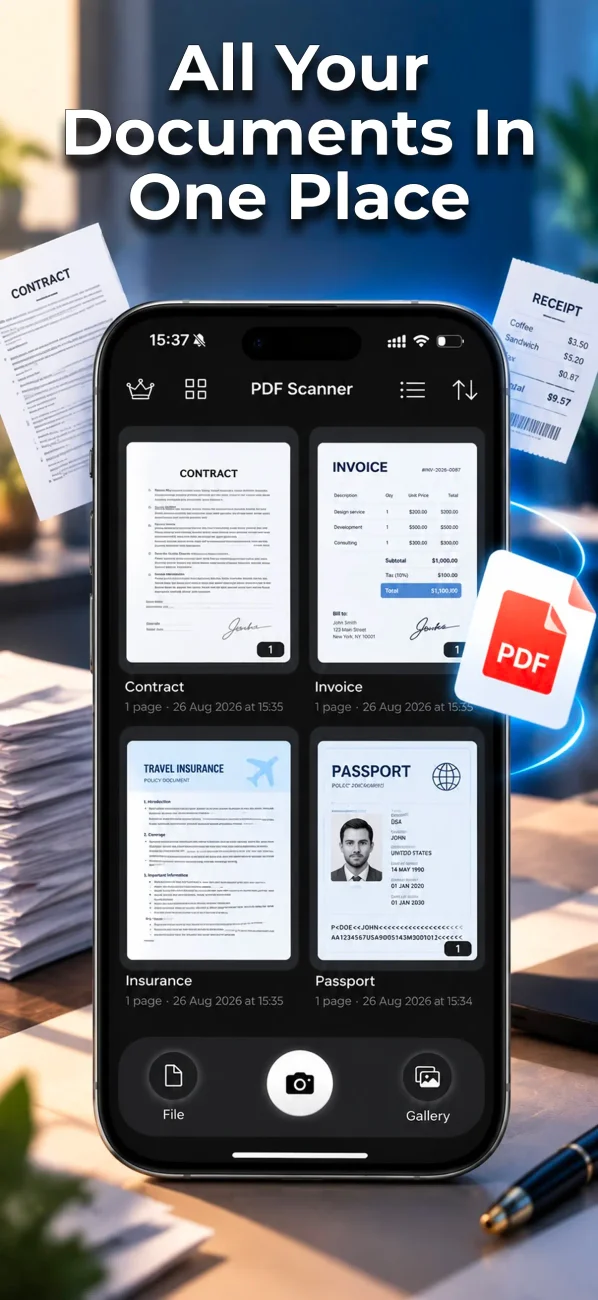
Turn your iPhone into a powerful document scanner. Capture paper documents with your camera, clean them up automatically, edit the recognized text right on the page, add your signature, and turn everything into a polished PDF — all without leaving the app.
SMART SCANNING
Point your camera at any document and PDF Scanner automatically detects the edges, corrects perspective, and crops it perfectly. Import photos from your gallery just as easily — auto-crop works there too.
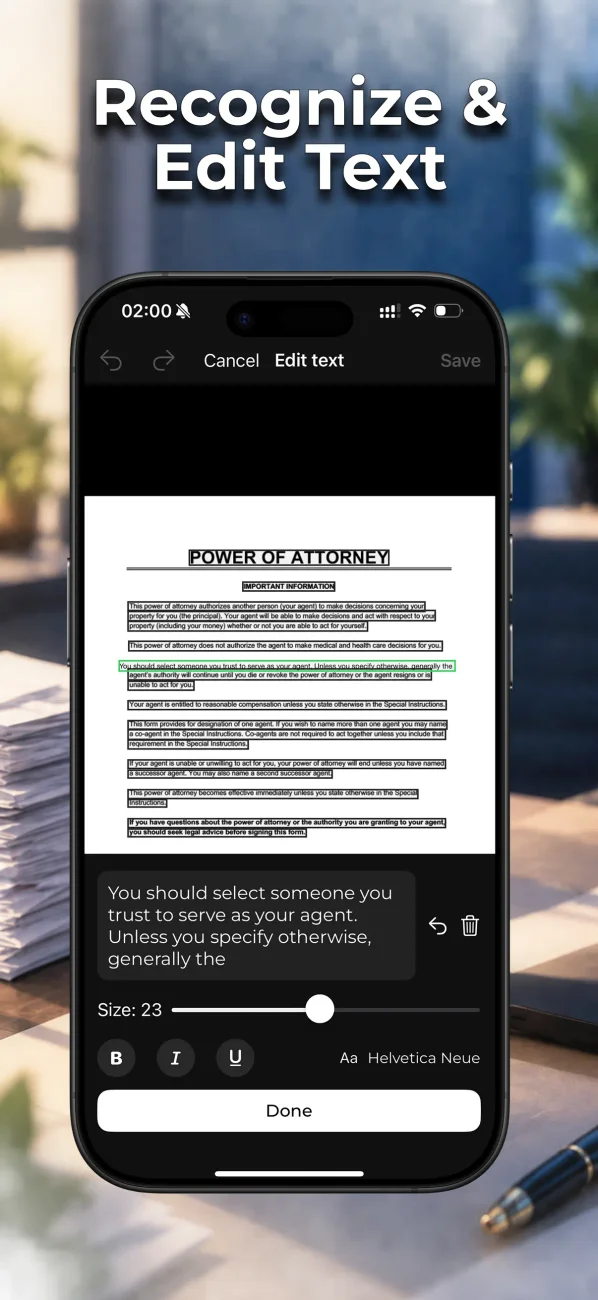
EDIT TEXT — NOT JUST SCAN IT
This isn't just OCR that copies text out. Tap any line of recognized text directly on the scanned page to retype it, change the font, resize it, or move it — the edit is patched right into the document, in place.
REAL SIGNATURES
Draw your signature with your finger, save it for reuse, and place it anywhere on the page. Resize, rotate, and adjust it precisely — or swap it out any time.
MERGE, SPLIT, AND ORGANIZE
Combine multiple scans into a single PDF, split a document into separate files, reorder pages, and keep everything organized with sorting and a clean list or grid view.
SHARE INSTANTLY
Export and share your finished PDF anywhere — Mail, Messages, cloud storage, or any app on your phone.
WHY PDF SCANNER
• No clunky menus — everything happens right on the page
• Clean, distraction-free design
• Your documents stay on your device
• Fast enough to scan a whole stack of papers in minutes
Whether it's a contract to sign, a receipt to save, or a stack of paperwork to digitize, PDF Scanner gets it done without the hassle of a physical scanner.
Privacy Policy: https://sites.google.com/view/pdfscanner-2026/privacy-policy
Terms of Use: https://sites.google.com/view/pdfscanner-2026/terms
Support: suppapp24@gmail.com
What’s new
Version 1.3.1 · Oct 17, 2026
• Fixed an issue where exported PDFs were too large
• New app icon
App privacy
What Oleh Antoniuk declares on the App Store about how this app handles data.
-
Data linked to you
May be collected and linked to your identity.
- Purchases
-
Data not linked to you
May be collected but is not linked to your identity.
- Identifiers
- Usage data
Privacy practices may vary, for example with the features you use or your age.
Information
- Seller
- Oleh Antoniuk
- Category
- Productivity
- Version
- 1.3.1
- Updated
- Oct 17, 2026
- Released
- Aug 19, 2026
- Size
- 8.0 MB
- Requires
- iOS 16.0 or later
- Age rating
- 4+
- Price
- Free
- In-app purchases
- Yes
- Languages
- English, Arabic, Dutch, French, German, Hindi, Indonesian, Italian, Japanese, Korean, Polish, Portuguese + 8 more
- Copyright
- © Oleh Antoniuk
You might also like
-
 PDF Editor for iPhoneEdit PDF Files
-
 PDF Scanner & Editor: LemonOCR, Sign, Print & Compress
-
 14 Days: Habit & Goal TrackerDaily Challenge & Streaks
-
 VARAK PDF Editor & ScannerEdit Text, Sign & Fill Forms
-
 PDF Toolkit: PDF Editor & ScanScan, Convert, Edit, Compress
-
 BossPDF: PDF Editor & ScannerEdit, Sign, Document Converter
-
 Textify: Convert PDF to TextScanned PDF OCR & Read Aloud
-
 OCR, Read & Convert DocumentsPDF, OCR, Scanner & CV
-
 Word Editor: Edit Docx & PDFWrite, format and review
-
 PDFX: Editor, Reader & SignerConvert, Fill & Annotate Docs